
Last year we moved evaluations out of paper and into Westgate Learn. This year they are built on One Standard of Excellence: The Westgate Competency Model.
Instead of writing your way to an overall rating, you rate the behaviors you observed against what great looks like for that Team Member's level, and the system averages them into the score.
Mark these dates. Evaluations lock when the cycle closes, so plan your performance conversations ahead of the deadline.
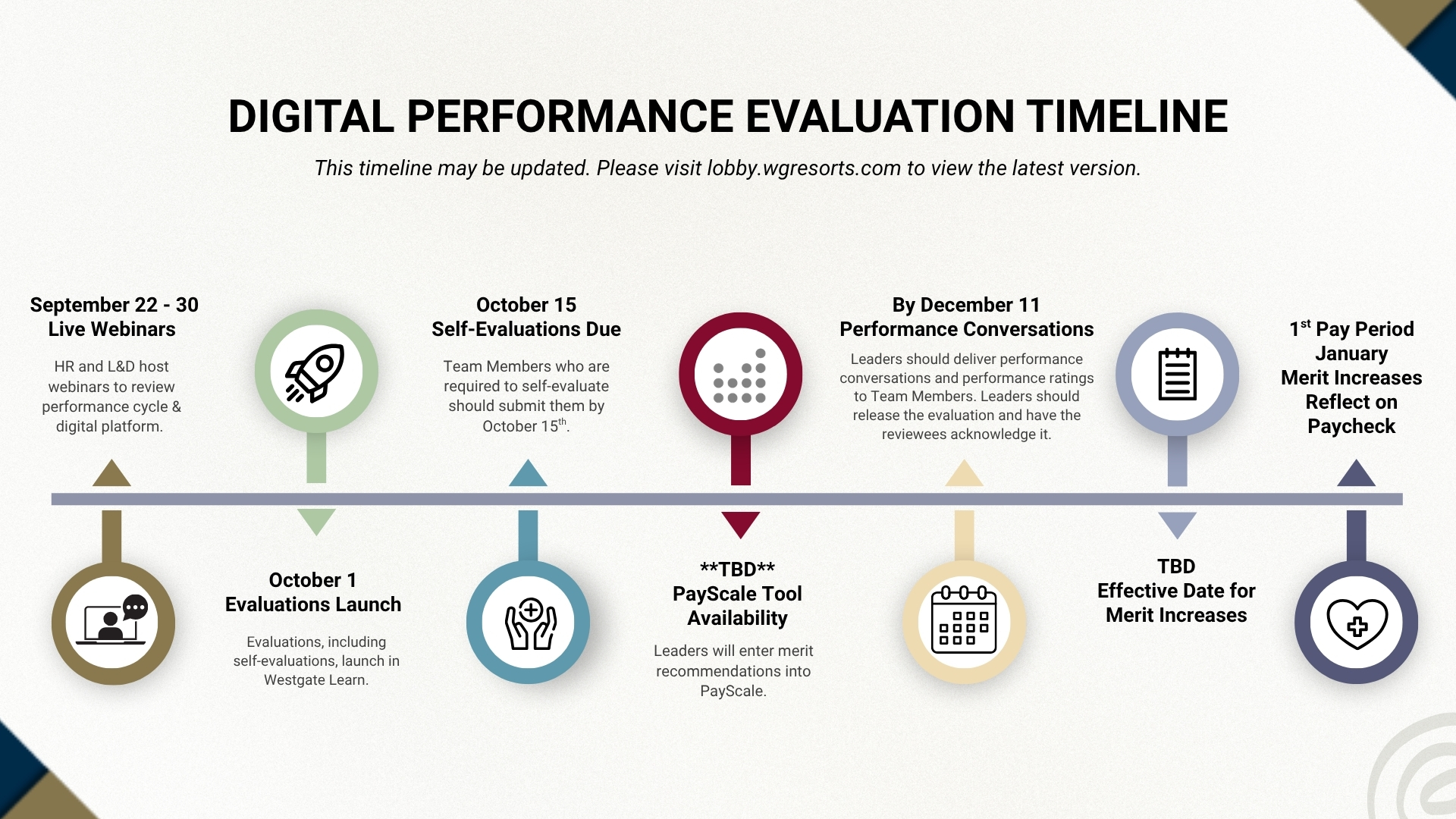
Merit and PayScale dates will be communicated separately by your People and Culture team.
What changed, and what stayed the same.
| 2025 | 2026 | |
|---|---|---|
| What you rate | Exempt evaluations used open-ended questions. Non-exempt evaluations scored general performance areas. | Everyone is rated on competencies. Individual contributors are rated on the 5 core competencies. Supervisors and above are rated on 12, the same 5 plus 7 leadership competencies. |
| How the overall score is built | Two different methods. Exempt leaders read the written answers and then selected an overall rating. Non-exempt scores were averaged by the system. | One method for every profile. The overall rating is the average of the competency ratings you give. Only the number of competencies changes by level. |
| Guidance for reviewing leaders | General rating definitions applied the same way to every Team Member. | Each competency carries behaviors written for the specific job level you are reviewing. What Service Excellence looks like from a supervisor is not what it looks like from a director, and the form reflects that. |
| Open-ended questions | Carried the weight of the exempt evaluation and drove the overall rating. | Still on every profile, four of them, and still unscored. They now anchor the growth conversation instead of carrying the score. |
| How your evaluation is assigned | Evaluation types assigned by job title, direct reports, and salaried or hourly status. | Five evaluation profiles assigned by Job Level in ADP. Review your ADP hierarchy now. If it is wrong, the evaluation routes to the wrong reviewing leader. |
| Who participates | Westgate properties and corporate. Westgate Las Vegas ran on a separate timeline. | All Westgate properties and corporate, plus VI Resorts by Westgate including Canada. Westgate Las Vegas launches on the same date as everyone else. Mexico is not included this cycle. |
| The 1 to 5 rating scale | Five point scale with an overall rating at the end. | Unchanged. The rating scale and how it is interpreted are exactly the same as last year. A 2.0 average still means improvement is needed to meet expectations in the role. |
Why this matters for reviewing leaders. The overall rating is now calculated rather than estimated. You rate what you observed against behaviors written for that Team Member's level, and the system does the math. That gives you a common reference point with your peers, so a 3 from you and a 3 from another director mean the same thing, and it gives you something concrete to point to when a Team Member asks how their rating was reached.
Everything you need for this cycle, in one place. Bookmark this section.
Training
Step-by-Step Guides
Getting Into Westgate Learn
Note: Certain pages in the Lobby, such as the HR Leader's Toolkit, are password-protected. Reach out to your local HR contact for the password.
Tap any question to expand. If you do not see what you need, reach out using the contact options at the bottom of this page.
The Change This Year
This year your evaluation is built on One Standard of Excellence: The Westgate Competency Model. Instead of answering open-ended questions and then choosing an overall rating, reviewing leaders rate competencies, and the overall rating is the average of those ratings.
Individual contributors are rated on the five core competencies. Supervisors and above are rated on twelve, those same five plus seven leadership competencies. Each competency includes behaviors written for that specific job level, so what is expected of a supervisor is described differently than what is expected of a director.
Every profile still ends with four open-ended questions. They are not scored. They anchor the growth conversation.
Competencies describe what great performance looks like in observable behavior rather than in general impressions. That does three things: it makes ratings more consistent between leaders, it gives Team Members a clear picture of what to work toward, and it connects your evaluation to the goal setting and training already aligned to the same model.
We encourage every Team Member to complete One Standard of Excellence: The Westgate Competency Model. It takes about 15 minutes and defines each competency with examples of what it looks like in practice.
If you are a reviewing leader, you will also be assigned the Performance Evaluation Training.
Take the CourseYour Evaluation
There are five evaluation profiles, assigned by job level:
The competencies are the same across leadership levels. The behaviors that describe each competency are written specifically for that level.
Job Level in ADP is the field that determines your evaluation profile. This is a change from last year, when job title, direct reports, and salaried or hourly status drove the assignment.
Your reviewing leader is your direct manager according to ADP reporting structure. If your hierarchy in ADP is not correct, your evaluation will route to the wrong leader.
Leaders: verify your direct reports in ADP now. Report discrepancies to your HRIS partner before the cutoff. If you notice an issue after evaluations launch, contact learn@wgresorts.com.
If you lead people at different job levels, you will see different behaviors on each of their evaluations. That is intentional. Read the behaviors on the form in front of you rather than applying one general standard across your whole team.
Tip: Evaluate people at the same level together rather than moving back and forth between levels.
Read the behaviors listed for that competency at that Team Member's job level, then apply the rating scale to those specific behaviors.
You are rating the behaviors described on the form, not your general impression of the competency.
Self-evaluation lets you share your own perspective on your performance. It mirrors the same competencies and questions your reviewing leader completes, and your leader sees your responses as they complete your evaluation.
Whether a self-evaluation is required depends on your role. Use the flow chart below to find out.
View the Self-Evaluation Flow ChartThey are still on every profile, four of them, and they are still not scored.
Last year they carried the weight of the exempt evaluation and drove the overall rating. This year they anchor the growth conversation: strengths with real examples, a specific development area, and what you will do to support it.
Timeline & Eligibility
See the timeline section above. Your People and Culture team will share more about the broader Performance & Merit Cycle.
Team Members employed at least 90 days as of October 1 fall within the evaluation requirement.
We strongly recommend leaders complete an evaluation for every Team Member regardless. These evaluations help identify areas for improvement, recognize achievements, and provide feedback for growth.
Note: evaluation eligibility and merit eligibility are two different things. The 90-day rule determines who is required to be evaluated. June 15 is the separate cutoff for merit increase eligibility.
Merit timing is being finalized. Your People and Culture team will communicate PayScale dates and the internal transfer deadline directly to leaders.
Each Team Member's direct manager, as reported in ADP.
Direct hierarchy issues to your HRIS partner. If an evaluation did not launch to the correct reviewing leader after launch, contact learn@wgresorts.com.
Participation
Yes. All VI Resorts by Westgate are participating this year, including Canada, with the exception of Mexico.
VI evaluations are completed digitally in Westgate Learn and align with the Westgate timeline rather than the previous June paper process.
Yes. Westgate Las Vegas launches on the same date as everyone else this year, which is a change from last cycle.
System & Support
No. Evaluations are available on computer, laptop, and tablet. Phones are not currently supported.
Yes. Your self-evaluation and completed evaluation from last year remain visible in your personal development area in Westgate Learn.
Check the date and the name before you open one. Last year's evaluations are named Exempt or Non-Exempt. This year's are named for your job level, such as Manager or Director. That is the fastest way to tell them apart.
Training is offered in several formats:
Your leader will meet with you to discuss your performance, then release the evaluation to you in Westgate Learn.
Once released, you can view your full evaluation, including all ratings, scores, and comments, and sign off that you received it.
Do not release an evaluation before you have met with your Team Member. The performance conversation must happen first so the Team Member hears their results directly from you and not through the system.
When you click Release, the Team Member immediately gains access to the full evaluation, including all ratings, scores, and written feedback. Once released, evaluations cannot be edited or retracted.
Your work is not lost between sessions. As long as you click Save after each step, your ratings and comments are stored until you are ready to release.
The reviewing leader can add a Co-Planner to the review, which invites another leader to contribute their perspective. Up to three Co-Planners can be added.
If you have trouble finding the person you want to add as a Co-Planner, reach out to learn@westgateresorts.com. We can assign a custom role so they appear as an option.
Co-Planner GuideYes. Managers of reviewing leaders can see the status of evaluations assigned to their leaders under Team Performance Reviews > View Only.
Missed a live session? Recordings are posted here after each webinar.
2026 Performance & Merit Cycle Overview
Full walkthrough of this year's cycle, the competency model, and the evaluation module in Westgate Learn.
Message from Leadership
What is changing this year and why, from our VPs of Human Resources and Learning & Development.
Recordings post after each session. Live webinars run September 22–24 and September 29–30. Register in Westgate Learn.
Reach out and we will get you pointed in the right direction.
Questions about the evaluation system, your profile, adding a Co-Planner, or a review that launched to the wrong leader.
learn@wgresorts.comTrouble logging in, a page that will not load, or something not working the way it should.
Submit a TicketQuestions about merit, compensation, ADP hierarchy corrections, or your specific situation.
Leader's HR Toolkit