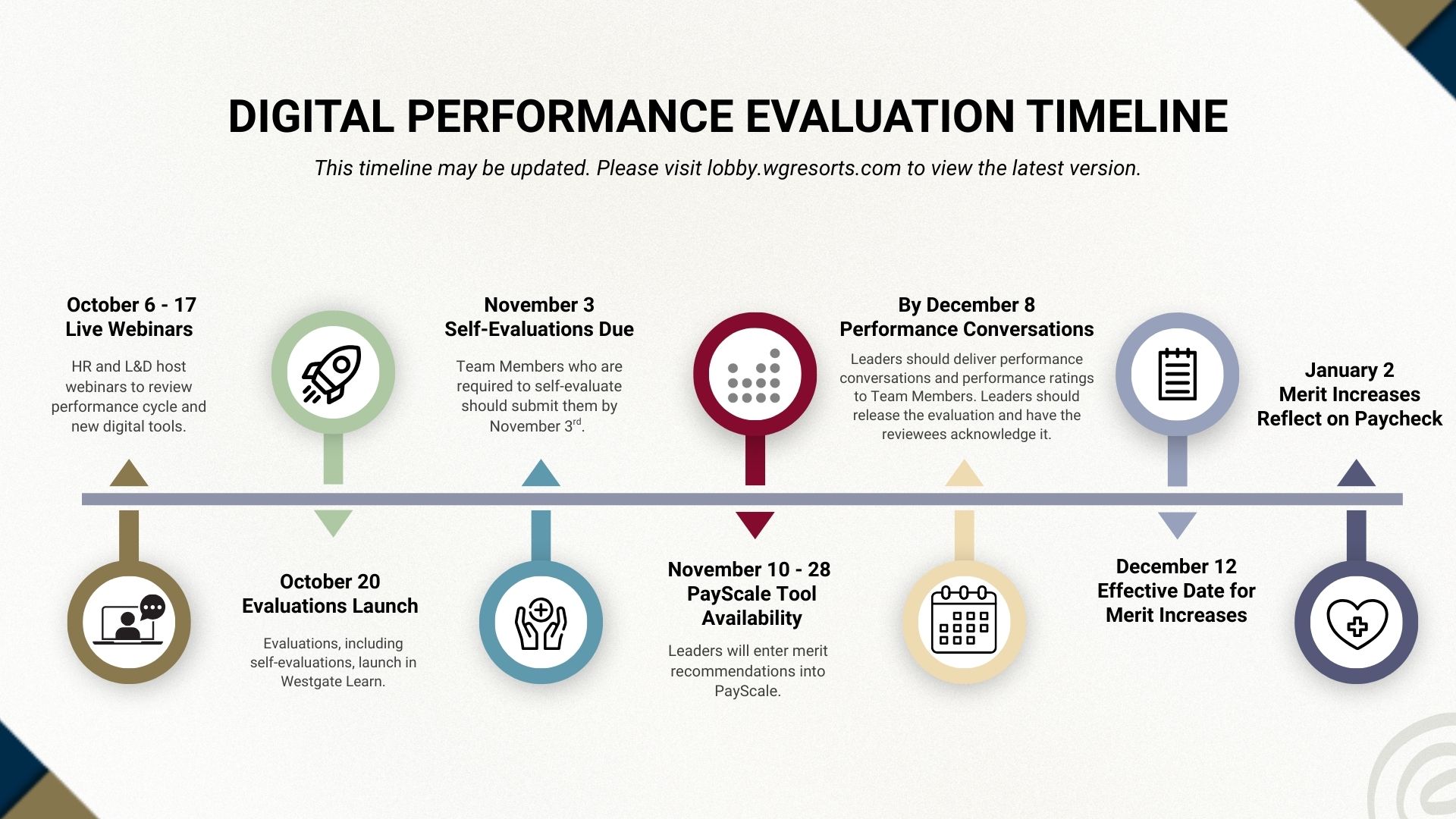
Starting in 2025, Westgate’s Performance Evaluations will be submitted in a digital format from the LMS (Learning Management System) instead of on paper.
Evaluations will be accessible on computer, laptop, and tablet devices. Mobile devices are not supported at this time.
No, performance evaluations cannot be completed on phones as the system is not
currently equipped to complete evaluations on mobile.
We strongly recommend leaders complete a performance evaluation for every Team Member. These evaluations help identify areas for improvement, recognize achievements, and provide valuable feedback for professional growth and development.
Team Members hired after June 15th are ineligible for merit increases.
Transferring, getting a promotion, a market adjustment, etc. does not make someone ineligible for a merit assuming they otherwise meet the eligibility criteria. However, if someone has received a salary increase because of a transfer, promotion, market adjustment, etc. the manager should take that into consideration when making a merit recommendation. Depending on the size of the increase, the recentness, and the Team Member’s overall compensation in the role the manager may choose to recommend a full merit, a smaller merit, or possibly no merit. It’s very situational and if leaders have questions they should consult with their HR partner. The June 15th date only applies to new hires.
Team Members hired after June 15th are ineligible for merit increases.
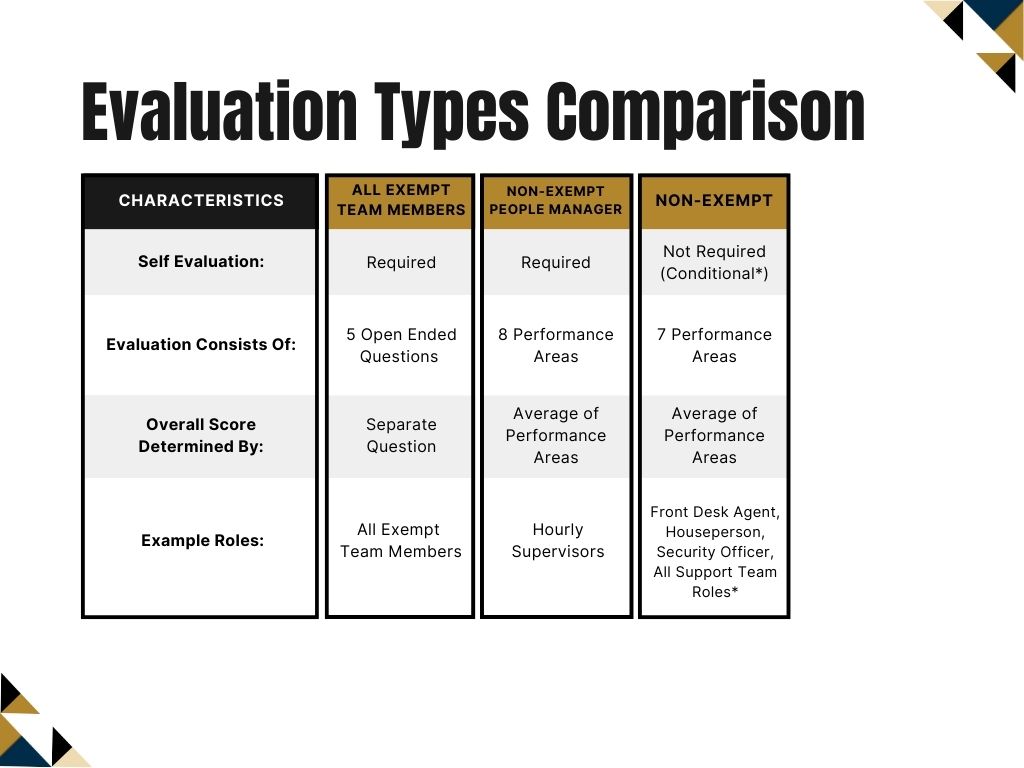
There are three (3) types of evaluations that are assigned based on your job title and responsibilities:
Evaluations are conducted by each Team Member’s direct manager (the Reviewing Leader) as reported in ADP.
Please direct any issues regarding hierarchy to your HRIS partners.
If the evaluation did not launch to the correct reviewer, please reach out to learn@wgresorts.com.
Self-evaluation allows the Team Member being evaluated to submit their perspective on their performance and mirrors the same questions and performance areas as the evaluation. It also provides the opportunity to submit commentary that the reviewing leader will have access to.
Managers of reviewing leaders can view completed evaluations in Westgate Learn under their Team Performance Reviews > View Only area.
For overall status updates, department heads and managers can email learn@wgresorts.com.
If the reviewing leader or manager of a Team Member is on leave of absence (LOA) please contact learn@wgresorts.com or enter a ticket through our IT ServiceNow portal so the reviewer can be adjusted.
No, only the reviewing leader can finalize a Team Member’s evaluation. The co-planner fills out an evaluation similar to the reviewing leader’s view, but it will not be visible to the Team Member being reviewed. The co-planner also cannot finalize the evaluation – the reviewing leader must ‘release’ the completed evaluation to finalize it and send it to the Team Member for sign-off.
Training will be offered in several formats. Reviewing leaders will be assigned online training in the LMS.
It is important that you do not release an evaluation before you have met with your Team Member. The performance conversation must always happen first so the Team Member hears their results directly from you and not through the system.
When you click Release, your Team Member will immediately gain access to their full performance evaluation in Westgate Learn, including all ratings, scores, comments, and written feedback you have entered.
Best practice: Update evaluations before the performance conversation occurs, release them immediately after the conversation, and ensure that each Team Member signs off on their evaluation (from their Westgate Learn account). All releases and acknowledgements must be completed before the December 8th deadline.